Electronic Do Not Disturb System Selection Guide for Hotels
Electronic do not disturb system selection guide: wired vs wireless, e-ink vs LED indicators, lock and PMS integration, and choosing the right system.
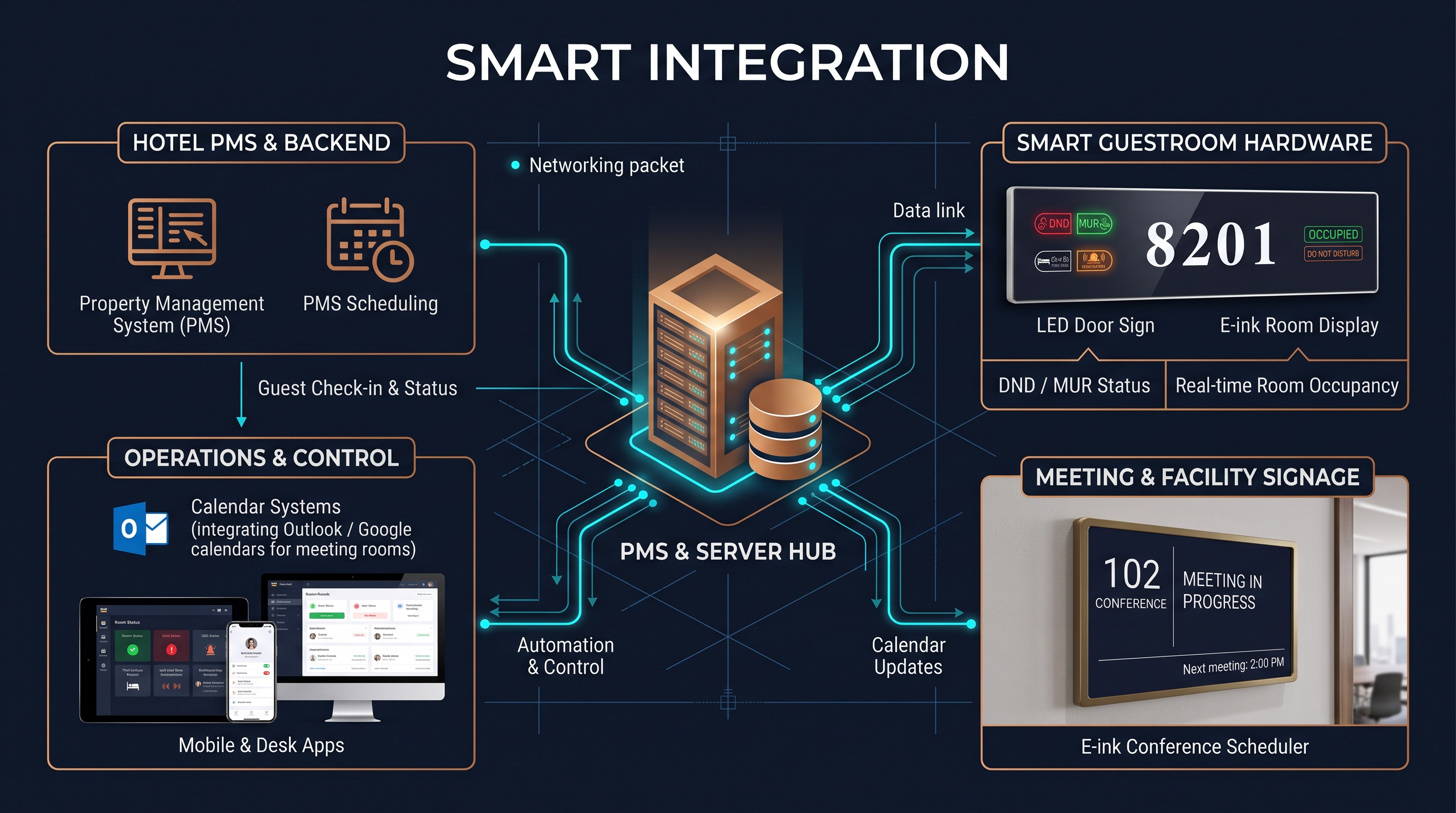
An electronic do not disturb system selection guide is the decision reference hospitality teams and IT staff use when replacing the paper hanger with a smart, in-room privacy system. An electronic do not disturb (DND) system replaces the do not disturb and make-up-room hanger that guests hang on the doorknob with a networked set of controls: a switch, button, or panel inside the room that the guest uses to request privacy or service, an indicator outside the door that shows the room's status, and, in modern systems, a controller that feeds that status to the property management system so housekeeping, maintenance, and front desk see it live. These systems improve privacy, streamline housekeeping, and integrate with the electronic door lock, the occupancy sensor, and the hotel's automation, turning a passive sign into part of the smart room. An electronic do not disturb system selection guide should walk a property through how these systems work, the main technology choices, and the integration, deployment, and cost decisions that separate a system that runs smoothly from one that creates new problems.
Electronic do not disturb systems are a growing standard in mid-market and upscale hotels because they solve a real operational problem: the paper hanger is one-way and unverifiable. With a hanger, housekeeping cannot know a room's status until staff walk the floor and look, and a guest who forgets to remove the hanger can leave a room marked for service or privacy incorrectly. An electronic DND system makes the status explicit, central, and current, so housekeeping routes workrooms efficiently, front desk answers guest requests accurately, and maintenance avoids entering a room a guest has flagged private. The systems vary in architecture, from a simple self-contained unit with a wall switch and an external indicator, to a fully networked system with wired or wireless room controllers, door locks, and occupancy integration feeding a central property management dashboard. An electronic do not disturb system selection guide exists to help a property choose the architecture that fits its size, its existing lock and software ecosystem, and its budget, rather than buying the most complex system available.
How an Electronic Do Not Disturb System Works
Understanding how an electronic do not disturb system works is the foundation of any electronic do not disturb system selection guide, because the architecture determines what a property can and cannot do. At the core, the system has three elements: the guest control, the door indicator, and the controller. The guest control is what the guest touches, typically a switch mounted on the headboard wall, a button on an in-room panel, or a toggle integrated with the room's lighting and automation keypad, with options such as privacy, make up room, and sometimes a doorbell function. The door indicator is the outward face of the system, mounted outside the guest room, showing the selected status through illuminated segments, an e-ink display, or backlit icons that read clearly from the corridor. The controller is the brain that connects the two and, in networked systems, links to the door lock, the occupancy sensor, and the property management system so the status is shared centrally rather than living only on the room's own circuit.
The way the guest control and the door indicator communicate defines the system's wiring and its behavior. In a simple wired system, the switch and the indicator are connected by low-voltage wiring run through the door frame and header, and the controller sits in the room or at the corridor, so the system works independently of any network. In a networked system, the controller reports the status over a wired bus such as RS485 or a wireless link such as Wi-Fi, Zigbee, or BLE, to a central gateway, and the gateway talks to the property management system so housekeeping and front desk see a live status map. The difference matters enormously for selection, because a wired, self-contained system is simpler, cheaper, and less dependent on the hotel's network, while a networked system enables the central visibility, the lock integration, and the automation that a smart hotel wants. An electronic do not disturb system selection guide should present this architecture clearly, because choosing between a self-contained system and a networked one is the first and most consequential decision a property makes.
The Main Types of Electronic Do Not Disturb Systems
Electronic do not disturb systems fall into distinct types, and an electronic do not disturb system selection guide should map them so a property can match a type to its goals. The simplest type is the self-contained wired system, where a wall switch inside the room drives an external indicator, and nothing connects to the network. This type is inexpensive, reliable, and easy to install in new construction where the wiring can be run during framing, and it fully solves the guest privacy request and the housekeeping visibility at the door, but it does not give front desk or housekeeping a central view. The next type is the networked system, which adds a room controller and a bus or wireless link to a central gateway, feeding room status to the property management system and enabling housekeeping dashboards, lock coordination, and automation. The networked type can be wired with RS485 for reliability or wireless for retrofit flexibility, and it is the choice for properties that want operational intelligence rather than just a smarter hanger.
Within both types, the external indicator and the guest control come in material variants that affect the look and the function. The indicator can be an illuminated LED face, a backlit icon, or an e-ink display, where e-ink offers a clean paper-like look, low power, and legibility in bright corridor light, while LED offers bright, easily read status at night. The guest control can be a simple privacy switch, a switch with a doorbell, or a multi-function keypad shared with lighting and thermostat controls. The door indicator can even integrate the room number display in some systems, showing the number and the status on the same face. An electronic do not disturb system selection guide should treat these as product families with real trade-offs, so a luxury property picks an e-ink or backlit aesthetic while a budget property picks a durable LED face, and so the guest control matches the room's automation rather than clashing with it.
Wired Versus Wireless Electronic Do Not Disturb Systems
The choice between a wired and a wireless electronic do not disturb system is a structural one that affects installation, reliability, and cost, and an electronic do not disturb system selection guide should weigh it carefully. A wired system, whether self-contained or networked over RS485, carries its signal over dedicated low-voltage cabling, which is the most reliable and secure option, immune to wireless interference and dependent only on the physical connection. The cost of wired is that the cabling must be planned and installed, which is straightforward in new construction where the walls are open, and expensive or disruptive in a retrofit where cables must be chased through finished walls and door frames. A wired network also requires a physical backbone and a commissioning step, but it scales predictably and is the standard for properties being built from scratch with a defined room control plan.
A wireless system trades the cabling for radios, using Wi-Fi, Zigbee, or BLE to carry status from the room controller to a gateway, which makes retrofit installation far simpler because there is no cable to run. The trade-offs are the radio environment, the need for reliable coverage near metal door frames and elevator shafts, the added gateway and network infrastructure, and the ongoing security and management of a larger wireless footprint. A hybrid approach is common, where the room control and the door indicator are wired together locally but the link to the central gateway is wireless, balancing on-room reliability with retrofit simplicity. An electronic do not disturb system selection guide should therefore frame the decision by build type: new construction favors wired for reliability and low marginal cost, while a renovation or a retrofit favors wireless, or a hybrid, to avoid tearing into finished walls, and the guide should confirm the property's radio environment and network readiness before committing to a wireless architecture.
Power is the quiet third rail of the wiring decision. A self-contained wired system and a networked wired system both need a low-voltage power feed at each room and at the corridor controller, which is normally taken from the room's power distribution during construction, while a wireless system still needs power for the room controller, the indicator, and the gateway even though it saves the signal cabling. A hybrid system, with local wiring between the switch and the indicator and a wireless backhaul, needs power at both ends but saves the long cable runs. Battery-powered indicators exist for the simplest retrofits, but they require periodic replacement or recharging and are best limited to low-duty installations. An electronic do not disturb system selection guide should surface the power plan for each candidate, because the availability of power at the door header, the ability to run low-voltage wiring, and the maintenance load of any battery backup all affect which system is realistic for a given building and are among the easiest details to overlook until installation.
Electronic Do Not Disturb System Integration with Locks and PMS
The full value of an electronic do not disturb system comes from integration, and an electronic do not disturb system selection guide should treat integration as a requirement, not an optional extra. The two most valuable integrations are with the electronic door lock and with the property management system. Lock integration links the DND status to the door itself, so that when a guest sets privacy, the door can be configured to restrict entry by housekeeping keycards, and when the guest requests make up room, the lock permits service access, giving the front desk and security a clear, enforceable privacy policy. This integration is common in hotels whose DND system and door locks come from suppliers with open interfaces, and it turns the privacy request from a sign into an actual access rule. Property management system integration carries the room status to the housekeeping and front desk dashboards, so staff see every room's privacy or service state in real time rather than walking the floors.
The integration layer also extends to the occupancy sensor and the room automation. An occupancy sensor can confirm whether a room is actually occupied, distinguishing a guest who has set privacy and left from one who is inside, which improves housekeeping routing and supports energy-saving HVAC and lighting control that act on real occupancy. Room automation can tie the DND switch to the room's lighting keypad, thermostat, and doorbell, so the guest controls privacy and room settings from one panel. An electronic do not disturb system selection guide should push a property to confirm the integration paths before selecting a system, because a system with a closed, proprietary interface that cannot talk to the property's existing lock and PMS is far less valuable than one that opens a documented interface. The guide should ask whether the supplier offers the API, the gateway, and the software partners the property already uses, because integration is where a DND system becomes operational intelligence rather than a networked sign.
Choosing an Electronic Do Not Disturb System by Property Profile
No single electronic do not disturb system fits every property, and an electronic do not disturb system selection guide should help a team choose by property profile rather than by feature count. A small boutique hotel with a few dozen rooms and a light IT load is often best served by a simple, reliable wired system that solves privacy and housekeeping visibility without adding a central network to maintain. A mid-size business hotel with a standard lock ecosystem and an existing property management system benefits from a networked system that delivers housekeeping dashboards and lock integration, and a large chain or convention property with many rooms, multiple buildings, and sophisticated automation is the natural home for a fully networked system with wired or wireless room controllers, occupancy integration, and a central platform. Matching the system to the property's operational maturity prevents both under-building, buying a system too simple to help, and over-building, buying a network and integration layer the property cannot staff or manage.
The property's existing technology is a decisive factor. A property that already uses a specific electronic lock brand or a specific property management system should prefer a DND system that integrates with those existing products, because switching lock or PMS vendors to accommodate signage is rarely worth it. A property planning a full smart-room program, with occupancy, lighting, and energy management, should choose a DND system that sits inside that automation architecture rather than a standalone one that becomes an island. The budget and the staffing also set the ceiling: a networked system needs an IT team or a capable integrator to commission and maintain, while a self-contained system needs almost nothing once installed. An electronic do not disturb system selection guide should therefore be read as a matching exercise, aligning the system's complexity, integration, and maintenance burden with the property's size, technology, and support resources.
Electronic Do Not Disturb System Selection Checklist
A practical electronic do not disturb system selection guide should end in a checklist that a procurement or IT team can run against each candidate system, and the checklist covers architecture, integration, hardware, and vendor. On architecture, the team should confirm whether the system is wired, wireless, or hybrid, whether it is self-contained or networked, and whether that matches the build type and the network readiness of the property. On integration, the team should verify that the system integrates with the property's electronic lock brand, its property management system, and any occupancy or automation platform, with documented interfaces rather than vague claims. On hardware, the team should confirm the guest control options, the door indicator type, the power and wiring requirements, and whether the indicator can display the room number and status on one face where the design calls for it.
On the vendor and the operation, the checklist should cover the things that make a system succeed after purchase. The team should confirm the supplier provides commissioning support, the gateway and software infrastructure, and clear documentation, and that the system can be serviced and expanded over the property's life. The checklist should confirm the lead time, the sample and pilot process, and the spare parts policy, because an electronic system is more complex to maintain than a hanger and the vendor relationship matters more. And it should confirm total cost, not just hardware, including the controller, the gateway, the software licensing, the installation, and the ongoing maintenance, so the selection is made on an all-in basis. Running a shortlist through this checklist, in this order, is the most reliable way to choose an electronic do not disturb system that fits, because it forces the architecture, integration, and vendor decisions into the open before a single unit is ordered.
Sourcing and Deploying an Electronic Do Not Disturb System
Sourcing an electronic do not disturb system is different from buying static signage, and an electronic do not disturb system selection guide should walk the procurement through the extra discipline that networked hardware requires. Because the system involves electronics, software, integration, and commissioning rather than a passive plate, the buyer should require a working sample or a pilot room, not just a mockup, so the guest control, the door indicator, the lock integration, and the property management system link are proven before the property commits to a full deployment. The sample and pilot also validate the wireless coverage or the wiring plan in the actual building, catching radio dead zones or installation issues that a catalog cannot reveal. An OEM manufacturer that builds both the signage and the electronic indicators can supply the door signs and the electronic status face from one source, keeping the corridor finish consistent, while the integration and commissioning are validated in the pilot.
The deployment should be phased to protect operations. A pilot of a few rooms, or one floor, lets the housekeeping and front desk teams test the workflow, lets IT confirm the network integration, and lets the property measure the operational benefit before rolling out to the rest of the building. The rollout then proceeds floor by floor, reusing the validated configuration and the commissioning process, with spare units held for service and expansion. Because an electronic system touches the door locks, the property management system, and the network, the deployment needs a cross-functional owner who coordinates housekeeping, front desk, IT, and maintenance, rather than treating it as a simple sign install. An electronic do not disturb system selection guide that includes this sourcing and deployment path ensures the chosen system does not just arrive on site but actually operates, integrates, and improves the property, which is the only measure of a DND investment that matters.
The Payoff of a Well-Chosen Electronic Do Not Disturb System
The reward for selecting an electronic do not disturb system thoughtfully is operational, not just cosmetic, and an electronic do not disturb system selection guide should end with the value the property actually earns. Housekeeping stops walking floors to check hangers, because the status dashboard is live and current. Front desk answers privacy and service requests accurately, because the guest's intent is recorded at the switch rather than guessed from a hanger. Maintenance and security respect privacy reliably, because the lock integration turns a privacy request into an enforceable access rule. And the guest experience improves, because the privacy and make-up-room controls are intuitive, the status is shown clearly outside the door, and the room feels genuinely modern. Each of these is a small efficiency, and together they are the difference between a passive sign and a functioning smart room.
A system chosen to match the property's size, technology, and staff, integrated with the locks and the property management system it already runs, and sourced and deployed with a pilot and a phased rollout, pays for itself in housekeeping efficiency and guest satisfaction rather than becoming a stranded network that nobody uses. The alternative, buying the most feature-rich system on paper without the integration and the deployment discipline, tends to produce exactly that failure. An electronic do not disturb system selection guide exists to prevent it, steering the property through the architecture, integration, and deployment decisions in the order that matters. For a hotel considering the shift from the hanger to the smart sign, the guide turns a promising but complex purchase into a measured, integrated, and reliable upgrade.
Not sure which sensor fits your project?
Talk to our mmWave application engineers for a free consultation.
Specify your hotel project with our engineers
Send your room count, ceiling type, and protocol preference. We will return a sample plan and quote within 24 business hours.
- Move from general guidance into a product or application discussion.
- Use RFQ when pricing, drawings, MOQ, or launch timing needs structure.
- Keep a direct contact path visible for fast clarifications and handoff.